Buy discounter-online.com ?
We are moving the project
discounter-online.com .
Are you interested in purchasing the domain
discounter-online.com ?
domain@kv-gmbh.de · 0541-91531010
Buy discounter-online.com ?
How do I subtract the cell value of another cell in VBA?
To subtract the value of one cell from another in VBA, you can use the following syntax: ```vba Range("A1").Value = Range("B1").Value - Range("C1").Value ``` This code subtracts the value of cell C1 from the value of cell B1 and then assigns the result to cell A1. You can adjust the cell references as needed for your specific scenario. **
How can I transfer the value of an Excel cell to another cell and then delete the original cell?
You can transfer the value of an Excel cell to another cell by simply clicking on the cell you want to transfer the value from, then copying the value (Ctrl+C or right-click and select "Copy"). Next, click on the cell you want to transfer the value to, and paste the value (Ctrl+V or right-click and select "Paste"). Once the value has been successfully transferred, you can delete the original cell by right-clicking on it and selecting "Delete" or pressing the delete key on your keyboard. **

Similar search terms for Cell
Top-Angebote
Products related to Cell:
-
Cell 7 Series 3 Books Collection Set by Kerry Drewery (Cell 7, Day 7, Final 7)Description:. Condition: BRAND NEW. Format: Paperback. Cell 7:. Should she live or should she die? You decide.A heart-stopping thriller. Shortlisted for the Lancashire Libraries Book of the Year 2018.An adored celebrity has been killed. Sixteen-year-old Martha Honeydew was found holding a gun, standing over the body.The general public will decide whether Martha is innocent or guilty by viewing daily episodes of the hugely popular TV show Death is Justice, the only TV show that gives the power of life and death decisions - all for the price of a premium rate phone call.. Day 7:. Martha Honeydew has been released from the terrifying Cell 7. But despite her new freedom, the corrupt judicial system is still tracking Martha's every move. And Isaac, her only trusted friend, is now imprisoned in the very same cells she was. Isaac saved Martha's life, it is only right she now saves his.. Final 7:. Martha and Isaac have escaped, but are now on the run - the government has branded them rebels and a danger to the public. Despite the rewards being offered for turning them in, Martha and her friends are safe in The Rises, the area of the city full of the poor and the powerless. But then the Prime Minister orders a wall to be built. Is it to keep those inside safe - or is it to imprison them?. Title. Cell 7 Series 3 Books Collection Set by Kerry Drewery (Cell 7, Day 7, Final 7). Delivery. Content. Reviews10,99 £*Shipping: 2,99 £Secure redirect to the provider
-
Uplifted Finds 3pcs Mini Beach Chair Cell Phone Stand 3pcs Mini Beach Chair Cell Phone StandAdd a professional standard of charm and utility to your desk with this 3piece Mini Beach Chair Phone Stand set, specifically engineered to provide a reliable and stylish way to hold your mobile devices. Featuring a unique foldable beach chair...39,97 $*Shipping: 0,00 $Secure redirect to the provider
-
Inspired Finds Fun Silicone Baby Cell Phone Teether Toy Fun Silicone Baby Cell Phone Teether ToyTurn teething time into playful exploration with this baby cell phone teether, a safe and engaging toy designed to soothe sore gums and stimulate tiny fingers. Its lightweight, soft silicone construction mimics the look of a phone so babies can...34,99 $*Shipping: 0,00 $Secure redirect to the provider
-
All Categories Goods Aluminum Fuel Cell Tank With Level Sender Top Feed Racing Fuel Cell For Drift And Performance Cars Aluminum Fuel Cell Tank With Level Sender Top Feed Racing Fuel Cell For Drift And Performance CarsReliable fuel delivery is critical when pushing your car to the limit. This aluminum fuel cell tank is designed for racers, drift drivers, and performance enthusiasts who demand consistent fuel flow and durability under extreme conditions. Built...299,97 $*Shipping: 0,00 $Secure redirect to the provider


-
How can the value of a selected Excel cell be displayed in another cell?
To display the value of a selected Excel cell in another cell, you can use a simple formula called the equal sign (=) followed by the cell reference of the selected cell. For example, if you want to display the value of cell A1 in cell B1, you would enter "=A1" in cell B1. This formula will automatically update the value in cell B1 whenever the value in cell A1 changes. **
-
How can I compare the value in cell A2 with a value in column C? If the value is present, then the value from cell B2 should be entered into the cell DX next to CX (with the corresponding cell number).
You can compare the value in cell A2 with the values in column C by using a formula like VLOOKUP or INDEX/MATCH. If the value is present in column C, you can use the formula to retrieve the corresponding value from cell B2. For example, if you are comparing A2 with C2:C100, you can use the formula in cell DX2 to check if A2 is present in C2:C100 and then enter the corresponding value from B2 into DX2. **
-
Can I make a cell in Excel take on a specific value when another cell has a specific value?
Yes, you can use conditional formatting in Excel to make a cell take on a specific value when another cell has a specific value. You can use the "IF" function to set up a condition that specifies what value the cell should take on based on the value of another cell. For example, you can use the formula =IF(A1="specific value", "desired value", "other value") to make cell B1 take on the value "desired value" when cell A1 has the value "specific value", and take on "other value" otherwise. **
-
How can I color the cell A1 in Excel if the value is greater than the value in cell A2?
To color the cell A1 in Excel if the value is greater than the value in cell A2, you can use conditional formatting. 1. Select cell A1. 2. Go to the 'Home' tab on the Excel ribbon. 3. Click on 'Conditional Formatting' and choose 'New Rule'. 4. Select 'Format only cells that contain' and choose 'greater than' in the first dropdown menu. 5. In the second dropdown menu, select 'Cell Value' and enter the reference to cell A2. 6. Click on the 'Format' button to choose the desired formatting options, such as the fill color, and then click 'OK' to apply the rule. **


What is the Excel formula to copy the value in cell A to cell C if the value is 1?
To copy the value in cell A to cell C if the value is 1, you can use the following Excel formula in cell C: =IF(A1=1, A1, ""). This formula checks if the value in cell A1 is equal to 1, and if it is, it copies that value to cell C1; otherwise, it leaves cell C1 blank. **
How can I add the value of one cell to the value of another cell in a Google Sheets script?
To add the value of one cell to another cell in a Google Sheets script, you can use the following formula: ```javascript var sheet = SpreadsheetApp.getActiveSpreadsheet().getActiveSheet(); var cell1 = sheet.getRange("A1").getValue(); var cell2 = sheet.getRange("B1").getValue(); var sum = cell1 + cell2; ``` In this script, we first get the values of the two cells (A1 and B1) using `getRange().getValue()`, then add them together to get the sum. Finally, you can use `setValue()` to write the sum to another cell if needed. **
Top-Angebote
Products related to Cell:
-
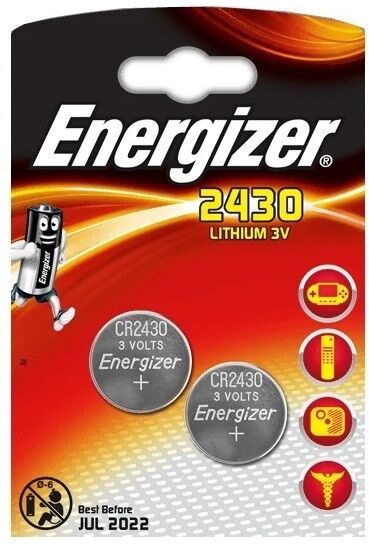
Energizer 637991 Button cell batteryContainer Type: Blister Pack; Operating Mode: Electric; Quantity Unit: Piece; Quantity: 2; Voltage [V]: 3; Battery Capacity [mAh]: 320; Weight [g]: 4.6; Height: 3; Diameter: 24.5; Vehicle type: CR 2430; Type: button cell; Rechargeability: Rechargeable6,29 £*Shipping: 8,45 £Secure redirect to the provider
-
Energizer 638179 Button cell batteryContainer Type: Blister Pack; Operating Mode: Electric; Quantity Unit: Piece; Quantity: 2; Voltage [V]: 3; Battery Capacity [mAh]: 620; Weight [g]: 6.8; Height: 5; Diameter: 24.5; Vehicle type: CR 2450; Type: button cell; Rechargeability: Rechargeable6,29 £*Shipping: 8,45 £Secure redirect to the provider
-
Cell 7 Series 3 Books Collection Set by Kerry Drewery (Cell 7, Day 7, Final 7)Description:. Condition: BRAND NEW. Format: Paperback. Cell 7:. Should she live or should she die? You decide.A heart-stopping thriller. Shortlisted for the Lancashire Libraries Book of the Year 2018.An adored celebrity has been killed. Sixteen-year-old Martha Honeydew was found holding a gun, standing over the body.The general public will decide whether Martha is innocent or guilty by viewing daily episodes of the hugely popular TV show Death is Justice, the only TV show that gives the power of life and death decisions - all for the price of a premium rate phone call.. Day 7:. Martha Honeydew has been released from the terrifying Cell 7. But despite her new freedom, the corrupt judicial system is still tracking Martha's every move. And Isaac, her only trusted friend, is now imprisoned in the very same cells she was. Isaac saved Martha's life, it is only right she now saves his.. Final 7:. Martha and Isaac have escaped, but are now on the run - the government has branded them rebels and a danger to the public. Despite the rewards being offered for turning them in, Martha and her friends are safe in The Rises, the area of the city full of the poor and the powerless. But then the Prime Minister orders a wall to be built. Is it to keep those inside safe - or is it to imprison them?. Title. Cell 7 Series 3 Books Collection Set by Kerry Drewery (Cell 7, Day 7, Final 7). Delivery. Content. Reviews10,99 £*Shipping: 2,99 £Secure redirect to the provider
-
Uplifted Finds 3pcs Mini Beach Chair Cell Phone Stand 3pcs Mini Beach Chair Cell Phone StandAdd a professional standard of charm and utility to your desk with this 3piece Mini Beach Chair Phone Stand set, specifically engineered to provide a reliable and stylish way to hold your mobile devices. Featuring a unique foldable beach chair...39,97 $*Shipping: 0,00 $Secure redirect to the provider
-
How do I subtract the cell value of another cell in VBA?
To subtract the value of one cell from another in VBA, you can use the following syntax: ```vba Range("A1").Value = Range("B1").Value - Range("C1").Value ``` This code subtracts the value of cell C1 from the value of cell B1 and then assigns the result to cell A1. You can adjust the cell references as needed for your specific scenario. **
-
How can I transfer the value of an Excel cell to another cell and then delete the original cell?
You can transfer the value of an Excel cell to another cell by simply clicking on the cell you want to transfer the value from, then copying the value (Ctrl+C or right-click and select "Copy"). Next, click on the cell you want to transfer the value to, and paste the value (Ctrl+V or right-click and select "Paste"). Once the value has been successfully transferred, you can delete the original cell by right-clicking on it and selecting "Delete" or pressing the delete key on your keyboard. **
-
How can the value of a selected Excel cell be displayed in another cell?
To display the value of a selected Excel cell in another cell, you can use a simple formula called the equal sign (=) followed by the cell reference of the selected cell. For example, if you want to display the value of cell A1 in cell B1, you would enter "=A1" in cell B1. This formula will automatically update the value in cell B1 whenever the value in cell A1 changes. **
-
How can I compare the value in cell A2 with a value in column C? If the value is present, then the value from cell B2 should be entered into the cell DX next to CX (with the corresponding cell number).
You can compare the value in cell A2 with the values in column C by using a formula like VLOOKUP or INDEX/MATCH. If the value is present in column C, you can use the formula to retrieve the corresponding value from cell B2. For example, if you are comparing A2 with C2:C100, you can use the formula in cell DX2 to check if A2 is present in C2:C100 and then enter the corresponding value from B2 into DX2. **
Similar search terms for Cell
-
Inspired Finds Fun Silicone Baby Cell Phone Teether Toy Fun Silicone Baby Cell Phone Teether ToyTurn teething time into playful exploration with this baby cell phone teether, a safe and engaging toy designed to soothe sore gums and stimulate tiny fingers. Its lightweight, soft silicone construction mimics the look of a phone so babies can...34,99 $*Shipping: 0,00 $Secure redirect to the provider
-
All Categories Goods Aluminum Fuel Cell Tank With Level Sender Top Feed Racing Fuel Cell For Drift And Performance Cars Aluminum Fuel Cell Tank With Level Sender Top Feed Racing Fuel Cell For Drift And Performance CarsReliable fuel delivery is critical when pushing your car to the limit. This aluminum fuel cell tank is designed for racers, drift drivers, and performance enthusiasts who demand consistent fuel flow and durability under extreme conditions. Built...299,97 $*Shipping: 0,00 $Secure redirect to the provider
-
JP GROUP 1115150200 Pulldown Cell, carburettorOperating Mode: pneumatic; Construction Year to: 12/1984, 01/1985, 09/1984, 07/1985; Production number to: 15.01.1985; Engine Code: ABN, EZ, DS, GU, GX, NP, EW; TecDoc Engine Number: 4074, 4974, 4100, 5007, 253, 3048,59 £*Shipping: 8,45 £Secure redirect to the provider
-
Can I make a cell in Excel take on a specific value when another cell has a specific value?
Yes, you can use conditional formatting in Excel to make a cell take on a specific value when another cell has a specific value. You can use the "IF" function to set up a condition that specifies what value the cell should take on based on the value of another cell. For example, you can use the formula =IF(A1="specific value", "desired value", "other value") to make cell B1 take on the value "desired value" when cell A1 has the value "specific value", and take on "other value" otherwise. **
-
How can I color the cell A1 in Excel if the value is greater than the value in cell A2?
To color the cell A1 in Excel if the value is greater than the value in cell A2, you can use conditional formatting. 1. Select cell A1. 2. Go to the 'Home' tab on the Excel ribbon. 3. Click on 'Conditional Formatting' and choose 'New Rule'. 4. Select 'Format only cells that contain' and choose 'greater than' in the first dropdown menu. 5. In the second dropdown menu, select 'Cell Value' and enter the reference to cell A2. 6. Click on the 'Format' button to choose the desired formatting options, such as the fill color, and then click 'OK' to apply the rule. **
-
What is the Excel formula to copy the value in cell A to cell C if the value is 1?
To copy the value in cell A to cell C if the value is 1, you can use the following Excel formula in cell C: =IF(A1=1, A1, ""). This formula checks if the value in cell A1 is equal to 1, and if it is, it copies that value to cell C1; otherwise, it leaves cell C1 blank. **
-
How can I add the value of one cell to the value of another cell in a Google Sheets script?
To add the value of one cell to another cell in a Google Sheets script, you can use the following formula: ```javascript var sheet = SpreadsheetApp.getActiveSpreadsheet().getActiveSheet(); var cell1 = sheet.getRange("A1").getValue(); var cell2 = sheet.getRange("B1").getValue(); var sum = cell1 + cell2; ``` In this script, we first get the values of the two cells (A1 and B1) using `getRange().getValue()`, then add them together to get the sum. Finally, you can use `setValue()` to write the sum to another cell if needed. **
* All prices are inclusive of VAT and, if applicable, plus shipping costs. The offer information is based on the details provided by the respective shop and is updated through automated processes. Real-time updates do not occur, so deviations can occur in individual cases. ** Note: Parts of this content were created by AI.