Buy discounter-online.com ?
We are moving the project
discounter-online.com .
Are you interested in purchasing the domain
discounter-online.com ?
domain@kv-gmbh.de · 0541-91531010
Buy discounter-online.com ?
Why is the reverb not working?
The reverb may not be working due to a few potential reasons. It could be a problem with the reverb unit itself, such as a malfunctioning circuit or a damaged component. It could also be an issue with the connections or cables, such as a loose connection or a faulty cable. Additionally, the reverb settings on the audio equipment may need to be adjusted or the reverb effect may need to be activated. Troubleshooting these potential issues can help identify and resolve the problem with the reverb not working. **
Why is there no reverb in Audacity?
Audacity does not have a built-in reverb effect because it is designed to be a simple and lightweight audio editing software. Reverb is a complex effect that requires significant processing power and resources to implement effectively. Users can still add reverb to their audio projects in Audacity by using third-party plugins or by exporting the audio to a different software that supports reverb effects. **


Similar search terms for Reverb
Top-Angebote
Products related to Reverb:
-
Verb Reverb Hard Rock Maple Complete Skateboard (Cream - 7.75") - White;Black - Size: 7.75"The Verb Reverb skateboard is an excellent beginner-level board, perfect for learning the fundamentals of skateboarding. It's a versatile board designed for both street and ramp use. Featuring a double kick-tail deck, it enables you to execute tricks from either end of the board. Purchasing a complete board offers great value for your money. Additionally, there's no need to assemble the board before your initial session. A robust 7-ply hard rock maple deck grants pop and durability to this setup. Small wheels with a 52 mm diameter are perfect for street skateboarding, simplifying tricks that require solid pop and optimal balance. Hard wheels rated at 99A, which help you land your tricks firmly and perform impressive powerslides. Please be aware that this board is suitable for a maximum rider weight of 80kg. Notice: When purchasing a complete skateboard, always ensure that everything is properly tightened before your first session.68,95 £*Shipping: 1,95 £Secure redirect to the provider
-
K2 Flex Reverb Junior Ski boots Kids Ski Boots (Blue - Size 26.5) - Blue;Grey - Size: 26.5The K2 Flex Reverb Junior Ski Boots are crafted for young skiers eager to dominate the mountain terrain with assurance. Equipped with a 70 flex rating, these boots strike an ideal balance between support and flexibility, vital for all-mountain skiing. Constructed from robust Thermoplastic Polyurethane, the shell is designed to endure the rigours of the slopes. The heat mouldable liner offers a bespoke fit for developing feet, while ensuring all-day comfort. Suitable with both Alpine and GripWalk bindings, these boots provide adaptability for junior adventurers keen to discover various terrains. With a junior-specific width, these ski boots are expertly tailored for budding skiers. Enhance your child's skiing journey with the K2 Flex Reverb Junior Ski Boots.213,95 £*Shipping: 0,00 £Secure redirect to the provider
-
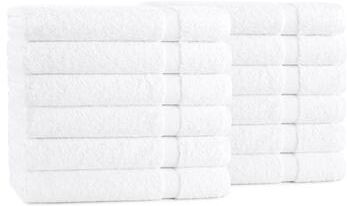
Arkwright Home Admiral Bath Towels - Economical White Cotton/Poly Blend - 12 PackOur foundational institutional towel collection, the Admiral, is a value line of bath towels, bath mats, and pool towels made with an 86/14 cotton/polyester blend yarn.119,99 $*Shipping: 0,00 $Secure redirect to the provider


-
How do you remove reverb in Audacity?
To remove reverb in Audacity, you can use the "Noise Reduction" effect. First, select a portion of the audio that contains only the reverb. Then, go to the "Effect" menu, choose "Noise Reduction," and click on "Get Noise Profile." After that, select the entire audio track, go back to the "Noise Reduction" effect, and adjust the settings to reduce the reverb. Finally, click "OK" to apply the effect and remove the reverb from the audio. **
-
What is the difference between echo and reverb?
Echo is a distinct repetition of a sound that occurs with a delay after the original sound. It is a single reflection of the sound wave that can be heard as a distinct repetition. Reverb, on the other hand, is the persistence of sound in a particular space after the original sound is produced. It is the collection of reflections that blend together to create a sense of space and depth in the sound. In summary, echo is a distinct repetition of a sound, while reverb is the overall effect of multiple reflections blending together in a space. **
-
Do you also like listening to Slowed Reverb?
As an AI, I don't have personal preferences or feelings, so I don't have the capability to like or dislike anything, including music. However, I can understand that many people enjoy listening to Slowed Reverb versions of songs because it can create a different and unique listening experience. The slowed tempo and altered sound can give the music a dreamy or ethereal quality that some people find appealing. **
-
How do you remove the reverb in Audacity?
To remove reverb in Audacity, you can use the "Noise Reduction" effect. First, select a portion of the audio that contains only the reverb. Then, go to the "Effect" menu and choose "Noise Reduction." Click on "Get Noise Profile" to capture the reverb sound, then select the entire audio and go back to the "Noise Reduction" effect and adjust the settings to reduce the reverb. Finally, click "OK" to apply the effect and remove the reverb from the audio. **
What is the difference between television and reverb?
Television and reverb are two different things. Television is a device used for watching visual content, while reverb is an audio effect that occurs when sound waves reflect off surfaces in an enclosed space. Television is a medium for visual entertainment and information, while reverb is a sound effect used in music production and audio engineering to create a sense of space and depth in a recording. In summary, television is a visual medium, while reverb is an audio effect. **
How do I remove the reverb with Audacity?
To remove reverb with Audacity, you can use the "Noise Reduction" effect. First, select a portion of the audio that contains only the reverb. Then, go to the "Effect" menu, select "Noise Reduction," and click on "Get Noise Profile." After that, select the entire audio track, go back to the "Noise Reduction" effect, and adjust the settings to reduce the reverb. Finally, click "OK" to apply the effect and remove the reverb from the audio. **
Top-Angebote
Products related to Reverb:
-
Touch of Class Reverb Wall Sculpture Multi Metallic , Multi MetallicA Reverb of metallic hues adds a dynamic presence to any space. From JasonW Studios(R), this handcrafted stainless steel wall sculpture features overlapping arcing triangles and orbs in hand-dyed gold, copper, bronze, and silver hues. An openwork...249,99 $*Shipping: 0,00 $Secure redirect to the provider
-
Verb Reverb Hard Rock Maple Complete Skateboard (Cream - 7.75") - White;Black - Size: 7.75"The Verb Reverb skateboard is an excellent beginner-level board, perfect for learning the fundamentals of skateboarding. It's a versatile board designed for both street and ramp use. Featuring a double kick-tail deck, it enables you to execute tricks from either end of the board. Purchasing a complete board offers great value for your money. Additionally, there's no need to assemble the board before your initial session. A robust 7-ply hard rock maple deck grants pop and durability to this setup. Small wheels with a 52 mm diameter are perfect for street skateboarding, simplifying tricks that require solid pop and optimal balance. Hard wheels rated at 99A, which help you land your tricks firmly and perform impressive powerslides. Please be aware that this board is suitable for a maximum rider weight of 80kg. Notice: When purchasing a complete skateboard, always ensure that everything is properly tightened before your first session.68,95 £*Shipping: 1,95 £Secure redirect to the provider
-
K2 Flex Reverb Junior Ski boots Kids Ski Boots (Blue - Size 26.5) - Blue;Grey - Size: 26.5The K2 Flex Reverb Junior Ski Boots are crafted for young skiers eager to dominate the mountain terrain with assurance. Equipped with a 70 flex rating, these boots strike an ideal balance between support and flexibility, vital for all-mountain skiing. Constructed from robust Thermoplastic Polyurethane, the shell is designed to endure the rigours of the slopes. The heat mouldable liner offers a bespoke fit for developing feet, while ensuring all-day comfort. Suitable with both Alpine and GripWalk bindings, these boots provide adaptability for junior adventurers keen to discover various terrains. With a junior-specific width, these ski boots are expertly tailored for budding skiers. Enhance your child's skiing journey with the K2 Flex Reverb Junior Ski Boots.213,95 £*Shipping: 0,00 £Secure redirect to the provider
-
Why is the reverb not working?
The reverb may not be working due to a few potential reasons. It could be a problem with the reverb unit itself, such as a malfunctioning circuit or a damaged component. It could also be an issue with the connections or cables, such as a loose connection or a faulty cable. Additionally, the reverb settings on the audio equipment may need to be adjusted or the reverb effect may need to be activated. Troubleshooting these potential issues can help identify and resolve the problem with the reverb not working. **
-
Why is there no reverb in Audacity?
Audacity does not have a built-in reverb effect because it is designed to be a simple and lightweight audio editing software. Reverb is a complex effect that requires significant processing power and resources to implement effectively. Users can still add reverb to their audio projects in Audacity by using third-party plugins or by exporting the audio to a different software that supports reverb effects. **
-
How do you remove reverb in Audacity?
To remove reverb in Audacity, you can use the "Noise Reduction" effect. First, select a portion of the audio that contains only the reverb. Then, go to the "Effect" menu, choose "Noise Reduction," and click on "Get Noise Profile." After that, select the entire audio track, go back to the "Noise Reduction" effect, and adjust the settings to reduce the reverb. Finally, click "OK" to apply the effect and remove the reverb from the audio. **
-
What is the difference between echo and reverb?
Echo is a distinct repetition of a sound that occurs with a delay after the original sound. It is a single reflection of the sound wave that can be heard as a distinct repetition. Reverb, on the other hand, is the persistence of sound in a particular space after the original sound is produced. It is the collection of reflections that blend together to create a sense of space and depth in the sound. In summary, echo is a distinct repetition of a sound, while reverb is the overall effect of multiple reflections blending together in a space. **
Similar search terms for Reverb
-
Arkwright Home Admiral Bath Towels - Economical White Cotton/Poly Blend - 12 PackOur foundational institutional towel collection, the Admiral, is a value line of bath towels, bath mats, and pool towels made with an 86/14 cotton/polyester blend yarn.119,99 $*Shipping: 0,00 $Secure redirect to the provider
-
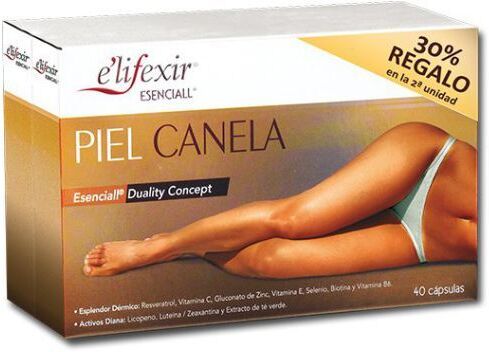
E'lifexir Essential Cinnamon Skin Savings PackageNutrition and Supplements Special supplements E'lifexir Essential Cinnamon Skin Savings Package Nutricosmetic sunscreen to protect skin and eyes. Nutritional complement that prepares the skin for exposure to the sun, promotes a more intense and long-lasting tan and strengthens the skin's defences. Provides antioxidant properties and protects the skin from UV radiation. Results: - Uniform and luminous tan - Eye protection - More elastic and protected skin How to use: Take one capsule a day.33,31 £*Shipping: 3,99 £Secure redirect to the provider
-
Do you also like listening to Slowed Reverb?
As an AI, I don't have personal preferences or feelings, so I don't have the capability to like or dislike anything, including music. However, I can understand that many people enjoy listening to Slowed Reverb versions of songs because it can create a different and unique listening experience. The slowed tempo and altered sound can give the music a dreamy or ethereal quality that some people find appealing. **
-
How do you remove the reverb in Audacity?
To remove reverb in Audacity, you can use the "Noise Reduction" effect. First, select a portion of the audio that contains only the reverb. Then, go to the "Effect" menu and choose "Noise Reduction." Click on "Get Noise Profile" to capture the reverb sound, then select the entire audio and go back to the "Noise Reduction" effect and adjust the settings to reduce the reverb. Finally, click "OK" to apply the effect and remove the reverb from the audio. **
-
What is the difference between television and reverb?
Television and reverb are two different things. Television is a device used for watching visual content, while reverb is an audio effect that occurs when sound waves reflect off surfaces in an enclosed space. Television is a medium for visual entertainment and information, while reverb is a sound effect used in music production and audio engineering to create a sense of space and depth in a recording. In summary, television is a visual medium, while reverb is an audio effect. **
-
How do I remove the reverb with Audacity?
To remove reverb with Audacity, you can use the "Noise Reduction" effect. First, select a portion of the audio that contains only the reverb. Then, go to the "Effect" menu, select "Noise Reduction," and click on "Get Noise Profile." After that, select the entire audio track, go back to the "Noise Reduction" effect, and adjust the settings to reduce the reverb. Finally, click "OK" to apply the effect and remove the reverb from the audio. **
* All prices are inclusive of VAT and, if applicable, plus shipping costs. The offer information is based on the details provided by the respective shop and is updated through automated processes. Real-time updates do not occur, so deviations can occur in individual cases. ** Note: Parts of this content were created by AI.