Buy discounter-online.com ?
We are moving the project
discounter-online.com .
Are you interested in purchasing the domain
discounter-online.com ?
domain@kv-gmbh.de · 0541-91531010
Buy discounter-online.com ?
How can I disable SSL?
To disable SSL, you can do so by modifying the configuration settings in your web server or application. In Apache, for example, you can edit the SSL configuration file to disable SSL by removing or commenting out the SSL related directives. In other web servers or applications, you can look for similar SSL configuration settings and disable them accordingly. Keep in mind that disabling SSL may have security implications, so it's important to carefully consider the reasons for doing so and to implement alternative security measures if necessary. **
Can FileZilla be used without SSL?
Yes, FileZilla can be used without SSL. When setting up a connection in FileZilla, you have the option to choose whether to use SSL/TLS or not. If you choose not to use SSL, your connection will be unencrypted and potentially less secure, but it is still possible to transfer files without SSL. However, it is generally recommended to use SSL/TLS for secure file transfers. **
Similar search terms for Ssl
Top-Angebote
Products related to Ssl:
-
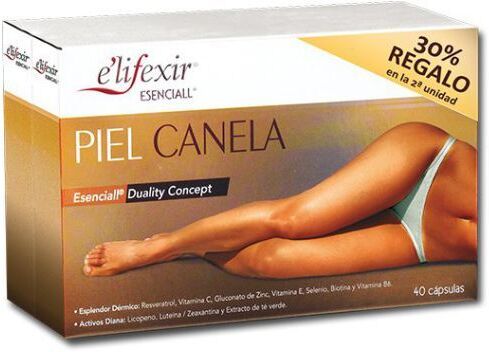
E'lifexir Essential Cinnamon Skin Savings PackageNutrition and Supplements Special supplements E'lifexir Essential Cinnamon Skin Savings Package Nutricosmetic sunscreen to protect skin and eyes. Nutritional complement that prepares the skin for exposure to the sun, promotes a more intense and long-lasting tan and strengthens the skin's defences. Provides antioxidant properties and protects the skin from UV radiation. Results: - Uniform and luminous tan - Eye protection - More elastic and protected skin How to use: Take one capsule a day.33,32 £*Shipping: 3,99 £Secure redirect to the provider
-
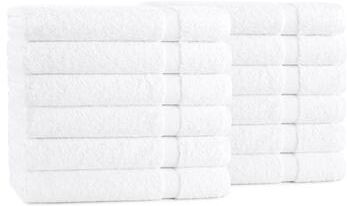
Arkwright Home Admiral Bath Towels - Economical White Cotton/Poly Blend - 12 PackOur foundational institutional towel collection, the Admiral, is a value line of bath towels, bath mats, and pool towels made with an 86/14 cotton/polyester blend yarn.119,99 $*Shipping: 0,00 $Secure redirect to the provider
-
Scholastic Bargain Book Box Grades K-1 (100 Books)A box of books at the best price! Take advantage of inventory conditions that leave some of our books without a permanent home. The list of titles in this collection will change depending on availability. A super way to save money and send every...235,00 $*Shipping: 0,00 $Secure redirect to the provider

-
Why are images not displayed after SSL?
Images may not be displayed after enabling SSL (Secure Sockets Layer) on a website due to mixed content issues. When a website is loaded over HTTPS, all resources on that page, including images, should also be loaded securely. If the images are linked using HTTP instead of HTTPS, modern browsers may block them from loading to protect the security and privacy of the users. To resolve this issue, all image URLs should be updated to use HTTPS to ensure they are displayed correctly on SSL-enabled websites. **
-
How does SSL encryption work at Strato?
At Strato, SSL encryption works by securing the connection between the user's web browser and the Strato server. When a user accesses a website hosted by Strato, the SSL certificate ensures that the data transmitted between the user's browser and the server is encrypted, making it difficult for unauthorized parties to intercept and read the information. This encryption process helps to protect sensitive data such as login credentials, personal information, and financial transactions. Strato uses industry-standard SSL/TLS protocols to ensure the security and privacy of its users' data. **
-
Why doesn't the Piaggio Zip SSL start?
There could be several reasons why the Piaggio Zip SSL doesn't start. It could be due to a dead battery, a faulty ignition system, a clogged fuel filter, or a problem with the spark plug. It's also possible that there is an issue with the fuel system, such as a clogged carburetor or a fuel line blockage. It's best to troubleshoot the specific issue by checking these components and consulting a mechanic if necessary. **
-
Why is no SSL certificate displayed at Strato?
Strato may not display an SSL certificate because they may not offer SSL certificates as part of their hosting packages. Alternatively, they may offer SSL certificates as an optional add-on that the website owner has not purchased or activated. It is also possible that the website owner has not properly configured or installed an SSL certificate on their website. Without an SSL certificate, the website may be flagged as insecure by browsers, potentially leading to security risks and loss of trust from visitors. **


What is the meaning of SSL error 2?
SSL error 2 typically indicates that the server certificate is not valid. This could be due to a variety of reasons such as the certificate being expired, the certificate not being issued by a trusted certificate authority, or the certificate not being properly installed on the server. When this error occurs, it means that the SSL/TLS handshake process cannot be completed because the server's certificate is not considered valid by the client's browser or application. This can result in the connection being terminated and the SSL error 2 being displayed to the user. **
How do I fix the GitLab SSL error?
To fix the GitLab SSL error, you can try the following steps: 1. Check the SSL certificate: Make sure that the SSL certificate installed on the GitLab server is valid and not expired. You can use SSL checker tools to verify the certificate. 2. Update GitLab configuration: Ensure that the GitLab configuration file (gitlab.rb) has the correct SSL settings, including the certificate and key file paths. 3. Restart GitLab services: After making any changes to the SSL configuration, restart the GitLab services to apply the changes. 4. Verify SSL settings: Use SSL testing tools to verify that the SSL configuration is correct and there are no errors. By following these steps, you can troubleshoot and fix the SSL error in GitLab. If the issue persists, you may need to seek further assistance from GitLab support or community forums. **
Top-Angebote
Products related to Ssl:
-
E'lifexir Essential Cinnamon Skin Savings PackageNutrition and Supplements Special supplements E'lifexir Essential Cinnamon Skin Savings Package Nutricosmetic sunscreen to protect skin and eyes. Nutritional complement that prepares the skin for exposure to the sun, promotes a more intense and long-lasting tan and strengthens the skin's defences. Provides antioxidant properties and protects the skin from UV radiation. Results: - Uniform and luminous tan - Eye protection - More elastic and protected skin How to use: Take one capsule a day.33,32 £*Shipping: 3,99 £Secure redirect to the provider
-
Arkwright Home Admiral Bath Towels - Economical White Cotton/Poly Blend - 12 PackOur foundational institutional towel collection, the Admiral, is a value line of bath towels, bath mats, and pool towels made with an 86/14 cotton/polyester blend yarn.119,99 $*Shipping: 0,00 $Secure redirect to the provider
-
How can I disable SSL?
To disable SSL, you can do so by modifying the configuration settings in your web server or application. In Apache, for example, you can edit the SSL configuration file to disable SSL by removing or commenting out the SSL related directives. In other web servers or applications, you can look for similar SSL configuration settings and disable them accordingly. Keep in mind that disabling SSL may have security implications, so it's important to carefully consider the reasons for doing so and to implement alternative security measures if necessary. **
-
Can FileZilla be used without SSL?
Yes, FileZilla can be used without SSL. When setting up a connection in FileZilla, you have the option to choose whether to use SSL/TLS or not. If you choose not to use SSL, your connection will be unencrypted and potentially less secure, but it is still possible to transfer files without SSL. However, it is generally recommended to use SSL/TLS for secure file transfers. **
-
Why are images not displayed after SSL?
Images may not be displayed after enabling SSL (Secure Sockets Layer) on a website due to mixed content issues. When a website is loaded over HTTPS, all resources on that page, including images, should also be loaded securely. If the images are linked using HTTP instead of HTTPS, modern browsers may block them from loading to protect the security and privacy of the users. To resolve this issue, all image URLs should be updated to use HTTPS to ensure they are displayed correctly on SSL-enabled websites. **
-
How does SSL encryption work at Strato?
At Strato, SSL encryption works by securing the connection between the user's web browser and the Strato server. When a user accesses a website hosted by Strato, the SSL certificate ensures that the data transmitted between the user's browser and the server is encrypted, making it difficult for unauthorized parties to intercept and read the information. This encryption process helps to protect sensitive data such as login credentials, personal information, and financial transactions. Strato uses industry-standard SSL/TLS protocols to ensure the security and privacy of its users' data. **
Similar search terms for Ssl
-
Scholastic Bargain Book Box Grades K-1 (100 Books)A box of books at the best price! Take advantage of inventory conditions that leave some of our books without a permanent home. The list of titles in this collection will change depending on availability. A super way to save money and send every...235,00 $*Shipping: 0,00 $Secure redirect to the provider
-
Bargain Houses Calder Heavy Duty Clear Plastic Carpet Protector Rectangle 68 x 762cmIdeal for year-round domestic or commercial use, ideal for the protection of high traffic areas of carpet, also suitable for lining car boots. Made from 100% vinyl this mat is waterproof, rot-proof and easy to clean. Brand Name: Bargain Houses. Mat Size: Rectangle 68 x 762cm44,99 £*Shipping: 4,99 £Secure redirect to the provider
-
Bargain Houses Calder Heavy Duty Clear Plastic Carpet Protector Rectangle 68 x 914.4cmIdeal for year-round domestic or commercial use, ideal for the protection of high traffic areas of carpet, also suitable for lining car boots. Made from 100% vinyl this mat is waterproof, rot-proof and easy to clean. Brand Name: Bargain Houses. Mat Size: Rectangle 68 x 914.4cm51,99 £*Shipping: 4,99 £Secure redirect to the provider
-
Why doesn't the Piaggio Zip SSL start?
There could be several reasons why the Piaggio Zip SSL doesn't start. It could be due to a dead battery, a faulty ignition system, a clogged fuel filter, or a problem with the spark plug. It's also possible that there is an issue with the fuel system, such as a clogged carburetor or a fuel line blockage. It's best to troubleshoot the specific issue by checking these components and consulting a mechanic if necessary. **
-
Why is no SSL certificate displayed at Strato?
Strato may not display an SSL certificate because they may not offer SSL certificates as part of their hosting packages. Alternatively, they may offer SSL certificates as an optional add-on that the website owner has not purchased or activated. It is also possible that the website owner has not properly configured or installed an SSL certificate on their website. Without an SSL certificate, the website may be flagged as insecure by browsers, potentially leading to security risks and loss of trust from visitors. **
-
What is the meaning of SSL error 2?
SSL error 2 typically indicates that the server certificate is not valid. This could be due to a variety of reasons such as the certificate being expired, the certificate not being issued by a trusted certificate authority, or the certificate not being properly installed on the server. When this error occurs, it means that the SSL/TLS handshake process cannot be completed because the server's certificate is not considered valid by the client's browser or application. This can result in the connection being terminated and the SSL error 2 being displayed to the user. **
-
How do I fix the GitLab SSL error?
To fix the GitLab SSL error, you can try the following steps: 1. Check the SSL certificate: Make sure that the SSL certificate installed on the GitLab server is valid and not expired. You can use SSL checker tools to verify the certificate. 2. Update GitLab configuration: Ensure that the GitLab configuration file (gitlab.rb) has the correct SSL settings, including the certificate and key file paths. 3. Restart GitLab services: After making any changes to the SSL configuration, restart the GitLab services to apply the changes. 4. Verify SSL settings: Use SSL testing tools to verify that the SSL configuration is correct and there are no errors. By following these steps, you can troubleshoot and fix the SSL error in GitLab. If the issue persists, you may need to seek further assistance from GitLab support or community forums. **
* All prices are inclusive of VAT and, if applicable, plus shipping costs. The offer information is based on the details provided by the respective shop and is updated through automated processes. Real-time updates do not occur, so deviations can occur in individual cases. ** Note: Parts of this content were created by AI.