Buy discounter-online.com ?
We are moving the project
discounter-online.com .
Are you interested in purchasing the domain
discounter-online.com ?
domain@kv-gmbh.de · 0541-91531010
Buy discounter-online.com ?
Why is WorldGuard not working?
WorldGuard may not be working for a variety of reasons, including incorrect configuration, conflicts with other plugins, or outdated versions. It's important to ensure that WorldGuard is properly installed and configured, and that it is compatible with the server version and other plugins being used. Additionally, checking for any error messages or logs can help identify the specific issue causing WorldGuard to not work as expected. **
Which plots are protected with WorldGuard?
WorldGuard protects specific plots designated by server administrators. These plots can include important areas such as spawn points, player homes, shops, and other player-built structures. WorldGuard allows server owners to set specific rules and permissions for each protected plot, ensuring that only authorized players can interact with or modify the designated areas. **
Similar search terms for WorldGuard
Top-Angebote
Products related to WorldGuard:
-
E'lifexir Essential Cinnamon Skin Savings PackageNutrition and Supplements Special supplements E'lifexir Essential Cinnamon Skin Savings Package Nutricosmetic sunscreen to protect skin and eyes. Nutritional complement that prepares the skin for exposure to the sun, promotes a more intense and long-lasting tan and strengthens the skin's defences. Provides antioxidant properties and protects the skin from UV radiation. Results: - Uniform and luminous tan - Eye protection - More elastic and protected skin How to use: Take one capsule a day.33,31 £*Shipping: 3,99 £Secure redirect to the provider
-
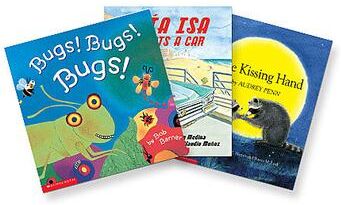
Scholastic Bargain Book Box Grades K-1 (100 Books)A box of books at the best price! Take advantage of inventory conditions that leave some of our books without a permanent home. The list of titles in this collection will change depending on availability. A super way to save money and send every...235,00 $*Shipping: 0,00 $Secure redirect to the provider



-
How can one protect animals in WorldGuard?
To protect animals in WorldGuard, you can use the "/region flag [region] mob-spawning deny" command to prevent animals from spawning within a specific region. This will help ensure that animals are not harmed or disturbed within that area. Additionally, you can use the "/region flag [region] passthrough allow" command to allow animals to freely move in and out of the protected region without being harmed. By setting these flags, you can create safe spaces for animals within your WorldGuard-protected areas. **
-
How can you protect animals in WorldGuard?
In WorldGuard, you can protect animals by using the `/region flag` command to set specific flags for certain regions. You can use the `mob-spawning` flag to prevent animals from spawning in a particular region. Additionally, you can use the `deny-spawn` flag to prevent all mobs, including animals, from spawning in a region. By setting these flags accordingly in the regions where you want to protect animals, you can ensure their safety within your Minecraft world. **
-
What are the WorldGuard flags for buttons?
The WorldGuard flags for buttons include "use" and "interact". The "use" flag controls whether players can use buttons, while the "interact" flag controls whether players can interact with buttons in any way, including using them. These flags can be used to control player access to buttons in specific areas, such as allowing or denying players from using buttons in certain regions of a Minecraft world. **
-
How do I disable damage in WorldGuard?
To disable damage in WorldGuard, you can use the `/rg flag <region> invincible deny` command to make a specific region invincible, preventing any damage from occurring within that region. You can also use the `/rg flag __global__ invincible deny` command to make the entire world invincible, preventing damage in all regions. Additionally, you can use the `/rg flag <region> pvp deny` command to disable player versus player damage in a specific region. These commands can be used to customize the level of damage protection in your WorldGuard regions. **


How can I disable WorldGuard in individual worlds?
To disable WorldGuard in individual worlds, you can use the "/rg remove" command followed by the world name to remove the protection from that specific world. For example, you can type "/rg remove <worldname>" to disable WorldGuard in the specified world. Make sure to have the necessary permissions to use WorldGuard commands in order to disable it in individual worlds. **
How can you change the messages in WorldGuard?
To change the messages in WorldGuard, you can modify the language file located in the WorldGuard plugin folder. Look for the "messages.properties" file and open it with a text editor. Here, you can edit the messages to your liking by changing the text after the equals sign. Save the file after making your changes and restart the server for the new messages to take effect. Remember to backup the original file before making any changes. **
Top-Angebote
Products related to WorldGuard:
-
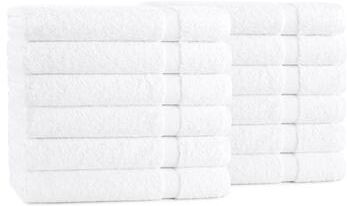
Arkwright Home Admiral Bath Towels - Economical White Cotton/Poly Blend - 12 PackOur foundational institutional towel collection, the Admiral, is a value line of bath towels, bath mats, and pool towels made with an 86/14 cotton/polyester blend yarn.119,99 $*Shipping: 0,00 $Secure redirect to the provider
-
E'lifexir Essential Cinnamon Skin Savings PackageNutrition and Supplements Special supplements E'lifexir Essential Cinnamon Skin Savings Package Nutricosmetic sunscreen to protect skin and eyes. Nutritional complement that prepares the skin for exposure to the sun, promotes a more intense and long-lasting tan and strengthens the skin's defences. Provides antioxidant properties and protects the skin from UV radiation. Results: - Uniform and luminous tan - Eye protection - More elastic and protected skin How to use: Take one capsule a day.33,31 £*Shipping: 3,99 £Secure redirect to the provider
-
Why is WorldGuard not working?
WorldGuard may not be working for a variety of reasons, including incorrect configuration, conflicts with other plugins, or outdated versions. It's important to ensure that WorldGuard is properly installed and configured, and that it is compatible with the server version and other plugins being used. Additionally, checking for any error messages or logs can help identify the specific issue causing WorldGuard to not work as expected. **
-
Which plots are protected with WorldGuard?
WorldGuard protects specific plots designated by server administrators. These plots can include important areas such as spawn points, player homes, shops, and other player-built structures. WorldGuard allows server owners to set specific rules and permissions for each protected plot, ensuring that only authorized players can interact with or modify the designated areas. **
-
How can one protect animals in WorldGuard?
To protect animals in WorldGuard, you can use the "/region flag [region] mob-spawning deny" command to prevent animals from spawning within a specific region. This will help ensure that animals are not harmed or disturbed within that area. Additionally, you can use the "/region flag [region] passthrough allow" command to allow animals to freely move in and out of the protected region without being harmed. By setting these flags, you can create safe spaces for animals within your WorldGuard-protected areas. **
-
How can you protect animals in WorldGuard?
In WorldGuard, you can protect animals by using the `/region flag` command to set specific flags for certain regions. You can use the `mob-spawning` flag to prevent animals from spawning in a particular region. Additionally, you can use the `deny-spawn` flag to prevent all mobs, including animals, from spawning in a region. By setting these flags accordingly in the regions where you want to protect animals, you can ensure their safety within your Minecraft world. **
Similar search terms for WorldGuard
-
Scholastic Bargain Book Box Grades K-1 (100 Books)A box of books at the best price! Take advantage of inventory conditions that leave some of our books without a permanent home. The list of titles in this collection will change depending on availability. A super way to save money and send every...235,00 $*Shipping: 0,00 $Secure redirect to the provider
-
The Rose Bargain Series 2 Books Collection Set by Sasha Peyton Smith - FictionTitles in This Set:. The Rose Bargain. The Thorn Queen[Hardcover]. Condition:BRAND NEW. Format:Mixedlot. ISBN:9789124022310. Overview:. The Rose Bargain Series brings two immersive romantasy novels from Sasha Peyton Smith into one irresistible collection. The Rose Bargain (Book 1) ladles readers into a London of velvet balls, dangerous bargains, and fae-driven intrigue. Set in 1848, England is ruled by an immortal fae queen who grants one chance to bargain for a deepest desire. Ivy Benton signs her name in blood to enter a competition for Prince Bram’s hand, navigating society’s expectations, rivalries, and a dangerous attraction to Bram’s enigmatic brother, Emmett. The blend of lush, historically tinged detail with magical politics and razor-sharp romance creates a page-turning experience for fans of romantasy and YA fantasy. The Thorn Queen (Book 2) continues the journey, widening the world and heightening the danger while preserving the distinctive voice that defined the first title. Together, this two-book collection offers a complete reading arc in one premium package—perfect for readers who crave sweeping romance, clever world-building, and a touch of enchantment in their fiction.. What Makes This Collection Special:. This two-book set is built for readers who want a full romantasy journey without juggling multiple volumes. Both titles share a lyrical, period-rooted atmosphere and a London-bright backdrop where courtly intrigue meets magical bargains. The Rose Bargain introduces a heroically witty heroine navigating debut season and dangerous love triangles; The Thorn Queen deepens the magic, politics, and emotional stakes, delivering a satisfying arc in a single, collectible package. For gift buyers and collectors, the matched design and cohesive tone provide instant shelf appeal and a ready-made reading stack for weekend binge sessions. Sasha Peyton Smith’s distinctive voice, backed by her status as a New York Times bestselling author, anchors an escapist fantasy with emotional honesty, making this set feel premium, complete, and highly desirable.. Books Included in This Collection:. The Rose Bargain. The Rose Bargain sweeps readers into a glittering, perilous London of 1848 where ambition and desire collide. Ivy Benton is poised for debut season, a heroine whose wit and resolve drive her through a web of social pressure, rivalries, and risk-taking romance. The tale pivots around a perilous bargain at the heart of the fae-ruled court, weaving political tension with intimate moments that sting and then soothe. Smith’s voice blends lush historical texture with modern sensitivity, delivering a romance that feels both relatable and fantastical, with vivid characters and an atmosphere that lingers long after the final page.. The Thorn Queen. The Thorn Queen is the companion title in this two-book collection, continuing the romantasy journey with the same lush setting and heightened stakes. Details of the plot aren’t listed here, but readers...18,99 £*Shipping: 2,99 £Secure redirect to the provider
-
Bargain Houses Calder Heavy Duty Clear Plastic Carpet Protector Rectangle 68 x 762cmIdeal for year-round domestic or commercial use, ideal for the protection of high traffic areas of carpet, also suitable for lining car boots. Made from 100% vinyl this mat is waterproof, rot-proof and easy to clean. Brand Name: Bargain Houses. Mat Size: Rectangle 68 x 762cm44,99 £*Shipping: 4,99 £Secure redirect to the provider
-
What are the WorldGuard flags for buttons?
The WorldGuard flags for buttons include "use" and "interact". The "use" flag controls whether players can use buttons, while the "interact" flag controls whether players can interact with buttons in any way, including using them. These flags can be used to control player access to buttons in specific areas, such as allowing or denying players from using buttons in certain regions of a Minecraft world. **
-
How do I disable damage in WorldGuard?
To disable damage in WorldGuard, you can use the `/rg flag <region> invincible deny` command to make a specific region invincible, preventing any damage from occurring within that region. You can also use the `/rg flag __global__ invincible deny` command to make the entire world invincible, preventing damage in all regions. Additionally, you can use the `/rg flag <region> pvp deny` command to disable player versus player damage in a specific region. These commands can be used to customize the level of damage protection in your WorldGuard regions. **
-
How can I disable WorldGuard in individual worlds?
To disable WorldGuard in individual worlds, you can use the "/rg remove" command followed by the world name to remove the protection from that specific world. For example, you can type "/rg remove <worldname>" to disable WorldGuard in the specified world. Make sure to have the necessary permissions to use WorldGuard commands in order to disable it in individual worlds. **
-
How can you change the messages in WorldGuard?
To change the messages in WorldGuard, you can modify the language file located in the WorldGuard plugin folder. Look for the "messages.properties" file and open it with a text editor. Here, you can edit the messages to your liking by changing the text after the equals sign. Save the file after making your changes and restart the server for the new messages to take effect. Remember to backup the original file before making any changes. **
* All prices are inclusive of VAT and, if applicable, plus shipping costs. The offer information is based on the details provided by the respective shop and is updated through automated processes. Real-time updates do not occur, so deviations can occur in individual cases. ** Note: Parts of this content were created by AI.